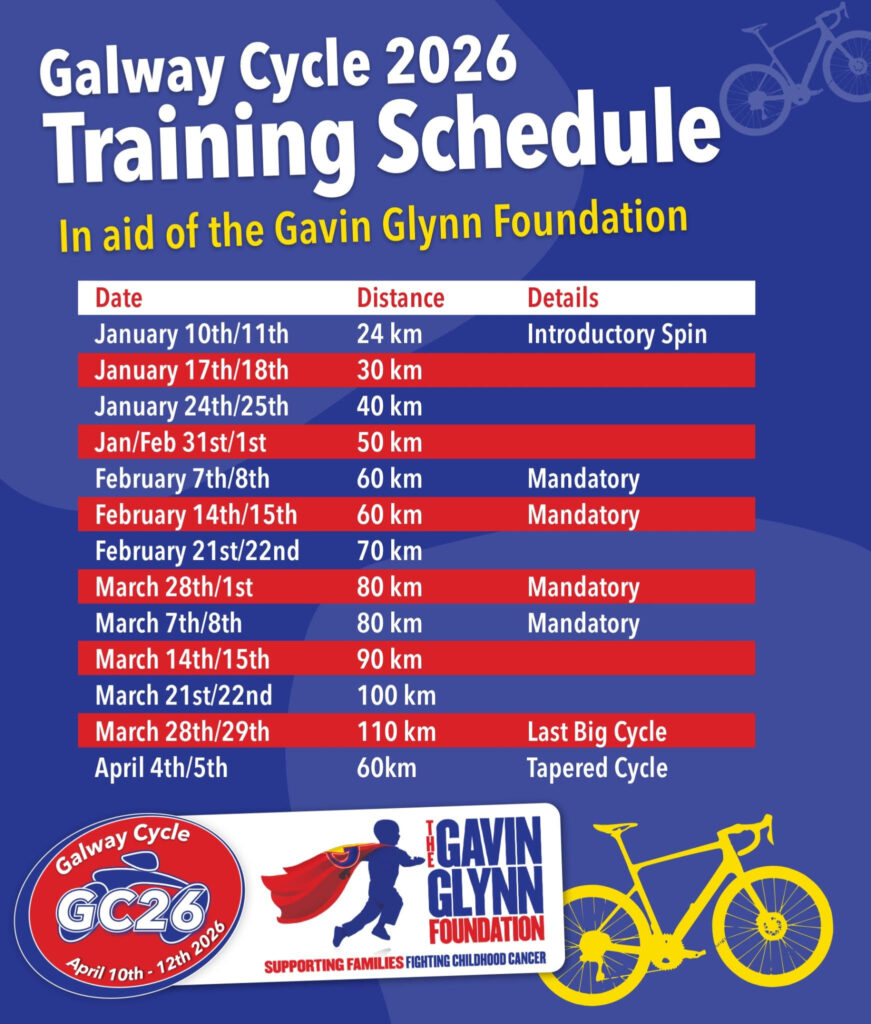
Official training for the Galway Cycle starts in January each year. From here, distances will increase by 10km each week.
You must attend at least 2 mandatory cycles throughout the training – one in February and one in March. You have a choice of 2 weekends in each month. These cycles are enforced to ensure that all participants are comfortable with cycling in a group prior to the weekend of the cycle.
Training leaves from the gates of the South Campus of Maynooth University each Saturday and Sunday at 10am (longer cycles later in training may leave at 9am). Please keep an eye on the Facebook page for the latest updates on training (e.g. weather, etc.).
All cyclists must satisfy the following prerequisites to attend training and/or to take part in the Galway Cycle event:
You must hold either a Leisure or Competition membership with Cycling Ireland.
You must wear a helmet on all cycles with the club.
Your bicycle must have a red rear light
Your bicycle must have a rear mudguard (see PDF below for more details)
This year marks our third year using the Cyql app to organise training spins, so you’ll be familiar with the process if you trained with us over the past two years. If not, don’t worry, we’ll guide you through it below.
Training Schedule
All training spins leave from the South Campus gates of Maynooth University.
Start Time: 10:00 AM sharp (arrive early to prepare)
Note: Longer cycles later in the season will start at 9:00 AM.
Event Days:
April 10th: G-Day!!
April 12th: Return Leg
Keep an eye on our Cyql app for any last-minute updates on weather or schedule changes.
Prerequisites for Training and the Galway Cycle Event
To participate in training or the event, you must:
Hold either a Leisure or Competition membership with Cycling Ireland.
Wear a helmet on all cycles.
Have a roadworthy bike equipped with:
A red rear light.
A rear mudguard.
New cyclists who do not have Cycling Ireland membership are welcome for the first three weeks. During this time, insurance will be provided if you register for each spin on the Cyql app. From week four onwards, proof of Cycling Ireland membership will be mandatory.
Using the Cyql App for Spin Registration
We’re continuing to use the Cyql app to streamline spin registration. Here’s how to get started: